Why we tried Flutter
Picking a user interface framework for an embedded board usually means choosing your trade-offs. We've tried both of the usual UI paths before, and neither one solves everything.
We've shipped Qt and GTK UIs, but both require careful cross-compilation and keeping build-machine and target versions in sync. Electron-style stacks, bundling Chromium through Electron or CEF, make the design side easier, but they add a browser's boot time and memory footprint. This can quickly become an issue on a resource-constrained board.
For a recent GenioBoard test, we decided to give Flutter a try. We wanted good performance and a UI that wouldn’t be problematic to build on our Yocto BSP, and would work on a board aimed at edge AI and IoT. Flutter started out as a mobile framework from Google, but it now runs on desktop and embedded systems too.
We built a live IoT dashboard to find out whether a mobile-scale framework (one that compiles to native code instead of running in a browser) could hold up on embedded Linux.
How Flutter works
Flutter is Google’s application framework, built around a declarative widget system in Dart and compiled ahead of time to native code. You put the UI together from Flutter’s widget library - which includes Material and Cupertino, along with the thousands of packages available on pub.dev. The compiler turns the Dart code into an ARM64 binary, and the Flutter engine uses Skia to render each frame. On embedded Linux there's no browser involved, since the engine talks straight to the GPU through OpenGL ES.
Dart code runs on embedded Linux, Android, iOS, desktop, and the web, so we could build the widget layer on a laptop and move it to the board largely as-is. Everything below that layer still needed dedicated work. Input handling and hardware access through FFI had to be built out, and ivi-homescreen and Wayland took the place of a mobile OS.
The embedder we've run on the GenioBoard is ivi-homescreen, a Wayland embedder Toyota originally built for its AGL (Automotive Grade Linux) project. It loads the AOT-compiled Dart bundle and manages the display surface. Input handling and platform channels run through it too. Everything above that layer is Dart, though you can drop into C or C++ through FFI for hardware access or anything performance-critical.
Two things stood out for us once we started using it:
Hot reload. You edit a widget, and the change shows up on the laptop screen right away without the app losing its state or restarting.
Null safety. Dart won't compile if you try to use a value that might not exist yet - you have to handle the empty case first. That mattered once the ViewModel was juggling four cards' worth of live data: a weather response might not come back in time, a calendar event might have no location set. Without null safety those gaps would have shown up as crashes or blank fields at runtime - instead, they were compile errors.
Why we looked at it for Genio
The GenioBoard's MediaTek Genio 700 SoC carries a Mali-G57 GPU, which can easily manage a modern dashboard UI as long as the framework uses it. Flutter does: every frame goes through Skia and out over OpenGL ES via ivi-homescreen.
The ecosystem mattered just as much as the GPU - pub.dev has mature packages for charting and theming, and they all work on ARM64 through the Yocto meta-flutter layer without modification. fl_chart handled the power graph without a single patch, shared_preferences handled theme storage, and intl worked the same way for date formatting. State management didn't even need a pub.dev package: Flutter's built-in ChangeNotifier was enough for the demo's MVVM setup.
Flutter's mobile install base runs into the hundreds of millions of users, and a team that's already shipped a Flutter mobile app won't find the embedded version foreign: the widget APIs and patterns are the same ones they already use, along with most of the documentation and community knowledge behind them. The difference is underneath, a Yocto recipe and a Wayland compositor instead of a mobile OS.
What we built
To test the stack, we built a single IoT Dashboard that exercises the full Flutter data-binding pipeline on the GenioBoard.
IoT Dashboard (Dart)
The real question was whether the framework could handle real-time updates without dropping frames or stuttering. State management runs on ChangeNotifier in a fairly standard MVVM setup: a StreamSubscription feeds new data into the ViewModel, which calls notifyListeners() and the UI updates. It runs fullscreen through ivi-homescreen, set with fullscreen = true in config.toml.
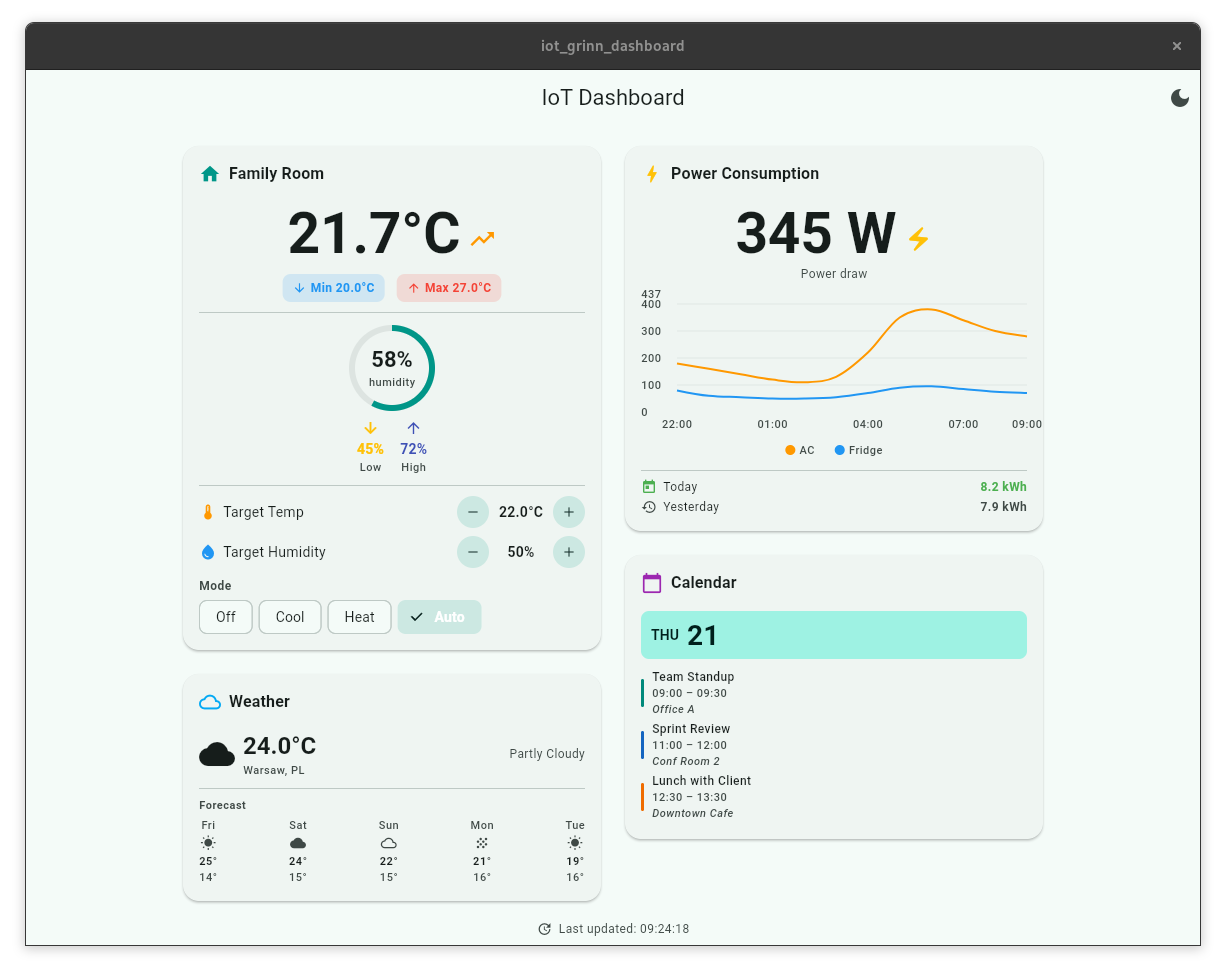
Four cards make up the layout:
| Card | What's on it |
|---|
| Climate | Live temperature with a trend arrow and min/max stats, a circular humidity gauge, and HVAC controls: a temperature stepper, a humidity stepper, and a mode switch (Off/Cool/Heat/Auto). |
| Power Consumption | Current wattage plus a 12-hour line chart (fl_chart) plotting AC and fridge power draw, with today-versus-yesterday kWh totals. |
| Weather | Current condition with icon and temperature, plus location and a 5-day forecast strip showing day names and highs/lows. |
| Calendar | Today's date and up to three upcoming events, each showing a colored sidebar, title, time range, and location where it applies. |
Expected behaviour
The layout scales to whatever display is attached: two columns on a wide screen, one column when things get narrower. It's built to render at full frame rate through the Flutter Skia OpenGL backend on Wayland.
Building Flutter into the Yocto image
Integration into meta-grinn-genio is thin, which is really the point. We added a meta-grinn-flutter layer on top of upstream meta-flutter (scarthgap), and the whole stack turns on by appending kas/flutter.yml to the build.
Upstream meta-flutter provides:
flutter-engine, which builds the runtime that executes the AOT-compiled Dart code
flutter-sdk, the cross-compilation toolchain
ivi-homescreen, the Wayland embedder
the flutter-app bbclass, which handles AOT compilation and bundle generation for any Flutter recipe
Our layer adds only what's specific to this board and this demo. A recipe for iot-grinn-dashboard pulls the Dart source from our Git repo and builds it for ARM64 through flutter-app. A config.toml puts ivi-homescreen into fullscreen, and a systemd service starts the dashboard automatically once weston.service is up, running as the weston user.
The recipe itself just fetches the source and pins a SRCREV; the rest is flutter-app and systemd doing what they already do, with no custom build logic on top.
We shipped the layer and recipes together with updates to our Yocto build pipeline for ARM64 targets, as a single patch. Build with kas-container and the flutter.yml overlay, flash with genio-flash over USB-C, the same process as any other Genio image. On boot, Weston comes up and the homescreen service launches the dashboard fullscreen.
No manual compiler patching, no weeks chasing missing dependencies. The hard parts are handled upstream; our additions stay specific to the board and the demo
What this means for real projects
- Prototyping speed
Most of the UI was built on a laptop with hot reload. We only brought in the board once we had real hardware and live data connected. That’s pretty much the opposite of the usual embedded workflow, where you often have to get the board up and running before you can even start iterating on the UI.
- No browser overhead
The compiled app runs directly through Flutter on the device, with the Mali-G57 handling rendering through OpenGL ES. There’s no browser stack or extra runtime using up memory in the background.
- A solid ecosystem
Libraries like fl_chart, shared_preferences, and intl all ran on ARM64 through Yocto’s meta-flutter layer without any changes.
- Easy to transfer from mobile
If your team already works with Flutter on mobile or desktop, the embedded side feels pretty familiar: same language, same patterns. Under the hood, you’re mostly adding the Yocto recipe, Wayland, and the embedder.
- Shorter path to the device
Design mockup → Flutter widgets → flutter-app bbclass → Yocto recipe → Yocto image → bootable board. There are fewer layers to work through than with Qt or a web stack.
Bottom line
Back to the question we started with: can a mobile-scale framework hold up on embedded Linux without the browser overhead or the baggage of a legacy widget toolkit?
Yes. During our test, the GPU was engaged, and the build fit into Yocto without issues. Live data, charts, gauges, and a responsive layout all ran smoothly on the Mali-G57.
The language and renderer work just as well for dashboards, kiosks, and industrial operator panels - only the deployment workflow changes from project to project. If you're evaluating hardware for an HMI project and your team already knows Flutter, the GenioBoard is a solid fit.
The demo dashboard runs in our standard Yocto image for the GenioBoard. If you want to see it on a board, get in touch with us.
We ran a similar test with Slint, another native-compiled UI toolkit, on this same board not long before this one. Read more about it here.



 Wojciech Krupski